Search one file or a whole project
Full-text search scoped to a single transcription or an entire project, so an assistant can answer from hundreds of hours of recordings at once.


Model Context Protocol
Give any MCP-compatible AI assistant access to your transcription library. Search, read, and cite your meetings, interviews, and lectures — or hand your assistant a recording to transcribe — from Claude, Codex, or any client that speaks the protocol.
Your transcripts hold answers your notes don't. The MCP server makes them queryable from the AI tools you already use.
Full-text search scoped to a single transcription or an entire project, so an assistant can answer from hundreds of hours of recordings at once.
Every search result includes the filename, speaker, timestamp, and original excerpt, plus a link that jumps to that exact position in the transcript.
Streamable HTTP with OAuth means no local server to run and no keys to paste — claude.ai, ChatGPT, Claude Desktop, Claude Code, and Codex CLI all connect to the same URL.
Read tools can't modify your account, and the only write action is submitting new audio to transcribe — an assistant can't edit or delete your data.
Full-text search across your library, answered with verbatim quotes and timestamp ranges.
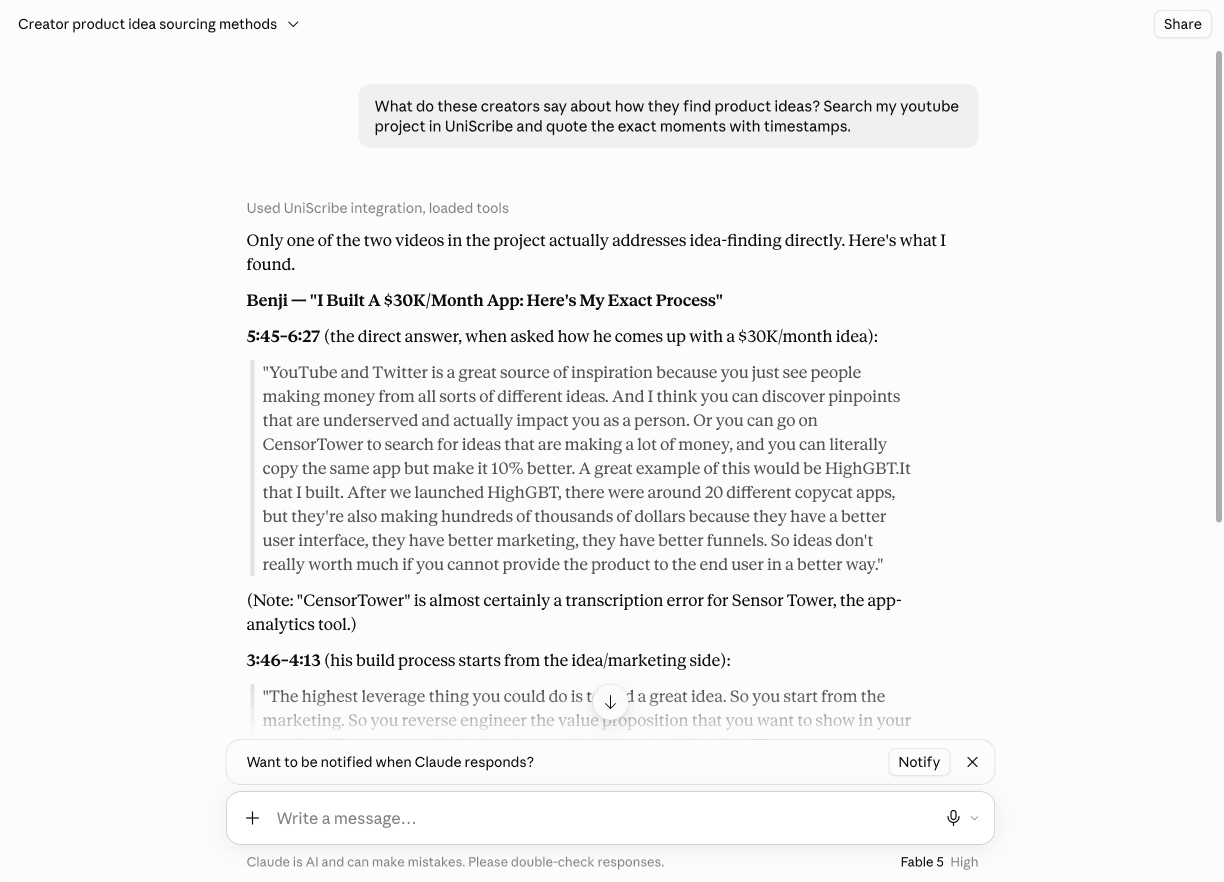
Any MCP client that supports streamable HTTP and OAuth can connect: add the URL, sign in with your UniScribe account, and approve access.
https://mcp.uniscribe.co/mcpFive read tools cover browsing, reading, and searching your library; two write tools submit new audio for transcription.
list_projectsList the projects (folders) in your UniScribe workspace so the assistant can scope a question to the right one.
list_transcriptionsBrowse your transcription library — recent files first, optionally filtered to a single project.
get_transcription_metadataFetch a transcription's details: filename, language, duration, speakers, and processing status.
get_transcript_segmentsRead the transcript itself, segment by segment, with speaker labels and timestamps.
search_transcriptsFull-text search inside one transcription or across an entire project, returning matching excerpts with citations.
create_transcriptionSubmit new audio or video for transcription from a URL — YouTube links, Dropbox/Google Drive share links, or direct media URLs. The language is auto-detected.
request_upload_urlGet a secure upload link for a local audio or video file, so the assistant can upload it and start a transcription (used together with create_transcription).
Every supported client — claude.ai, ChatGPT, Claude Desktop, Claude Code, and Codex CLI — connects with OAuth: sign in once, no API key. Requires a paid UniScribe plan.
Claude connects from its connector directory; ChatGPT adds the server as a custom connector. Both then use the same sign-in.
Claude (claude.ai & Desktop): open UniScribe in Claude's connector directory and click Connect, then continue with step 3.
ChatGPT desktop: open Settings → Plugins → MCPs → Add → Add MCP server, choose Streamable HTTP, name it UniScribe, and paste the server URL:
https://mcp.uniscribe.co/mcpClick Connect, sign in with your UniScribe account, and approve access. You'll be returned to the app with the connection live.
Manage or revoke OAuth connections anytime in UniScribe's Settings → Connected Apps.
CLI clients use the same OAuth sign-in: add the server, authenticate in the browser once, done.
Claude Code: one command plus a /mcp sign-in — see the Claude integration guide.
Codex CLI: two commands (add + login) — see the ChatGPT & Codex integration guide.
Point the client at the endpoint above using streamable HTTP; it will discover the OAuth server and open a browser window for you to sign in and approve. Stdio-only clients can use the mcp-remote bridge, which runs the same OAuth sign-in on their behalf:
{
  "mcpServers": {
    "uniscribe": {
      "command": "npx",
      "args": [
        "-y",
        "mcp-remote",
        "https://mcp.uniscribe.co/mcp"
      ]
    }
  }
}Once connected, talk to your transcript library the way you'd ask a colleague who was in every meeting.
“Summarize the key points from my recent interviews.”
“List my projects, then search the Customer Research project for mentions of pricing objections.”
“What did the customer say about onboarding in yesterday's call? Quote them with timestamps.”
“Compare what was said about the launch date across my last three team meetings.”
The MCP server is built to give assistants the minimum access needed to answer your questions — and nothing more.
Read tools can only read, and the two write tools can only submit new audio for transcription — nothing an assistant does through MCP can edit or delete existing data in your UniScribe account.
UniScribe doesn't store the content of the questions asked through MCP. Your conversations stay between you and your assistant.
Access is tied to an OAuth connection you control. Disconnect it in Settings → Connected Apps at any time and that client is cut off immediately.
Learn more about how UniScribe handles your data on the Security & Privacy page and in our Privacy Policy.
A focused walkthrough for Claude Code and Claude Desktop, with example prompts and FAQs.
Claude setup guideCodex CLI works today; the ChatGPT connector arrives with OAuth support.
ChatGPT integrationBuilding your own pipeline? Upload files, start transcriptions, fetch transcripts, and receive webhooks with the key-authenticated UniScribe API.
API documentationPoint any MCP client at the endpoint and sign in once — your entire transcript library becomes searchable from chat.